
Change your password
Choose a password only you know - from the menu under your name.
Where to find it
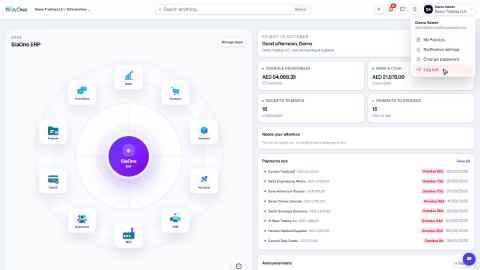
Top rightyour nameChange password
Before you start
You need your current password. If you have forgotten it, you cannot use this screen: on the sign-in page click Forgot password? and SiaOne emails you a link to choose a new one, or ask your administrator to set a new one for you under Settings > Administration > Users.
Steps
- Click your name at the top right.
- Choose Change password. A small window opens.
- Type your Current password.
- Type the New password - at least 8 characters - and type it again under Confirm new password. Click Show next to the new password if you want to check what you typed.
- Click Update password. Use the new password the next time you sign in. Click Cancel instead if you change your mind.
Tip
Choose a long password you do not use anywhere else, and do not share it - not even with your administrator. They can always set a new one for you.
What happens next
Make SiaOne easier on your eyes: switch between light and dark theme.
Was this lesson helpful?
Thank you for the feedback.
Keep learning
Sign in to SiaOne
Open your company's SiaOne address, sign in with your email and password, and find where to log out.
Find your way around
The home screen, the app menu bar, breadcrumbs, lists and record pages - the five things every SiaOne screen is built from.
Switch company and branch
Choose which company and branch you are working in, and understand which company a new document is saved to.
 1:28
1:28 1:41
1:41 1:59
1:59